
Home » Download

BK66 App Download for Faster Sports Betting and Secure Mobile Access
Get the BK66 app safely with quick steps for local mobile users
Move from slow tabs to one-tap play with the official app. Your BK66 app download puts live cricket, JILI slots, and secure account tools in your pocket. The app is built for BD mobile habits: quick loads, lighter data use, and simple verification that matches your account name with your preferred payment profile.
Play with confidence using two-factor security, device lock, and clear update prompts. Want direct access without searching? Save the official icon and open matches in seconds via BK66 Online.
Why the BK66 app suits fast-play habits and local data conditions
The app trims page weight, stores key assets, and keeps you signed in securely. It’s tuned for spotty 3G/4G and quick taps during live cricket moments.
Faster entry with one-tap login and device biometrics
Skip full passwords every time. Use fingerprint or face unlock, then confirm with your PIN for sensitive actions. Need to switch accounts? The BK66 login screen remembers your last user safely.
Stable betting on 3G and 4G with lighter pages and caching
Compressed images and cached menus cut reloads. Odds and betslips refresh efficiently, helping you place selections even when the signal dips.
Live cricket markets and instant score alerts keep you updated
Follow toss updates, powerplay lines, and final-over odds. Receive alerts for wickets, boundaries, and price changes so you never miss a swing.
Quick-launch JILI slots and top providers in one clean menu
Open JILI and other popular studios in two taps. Recently played titles sit on top, so your next spin starts faster.
Built-in verification and name-match checks for payout confidence
Profile checks and name-match rules help protect deposits and withdrawals. You see what’s verified before you submit any request.
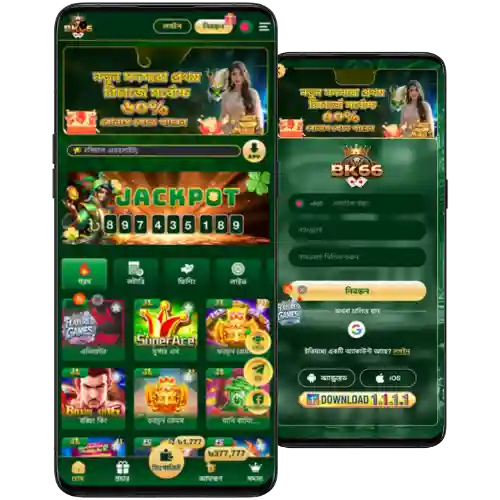
Step-by-step guide to download, install, and open the BK66 app
- Open the BK66 official site in Chrome (Android) or Safari (iOS).
- Tap the App section: choose Android (APK) or iOS (Add to Home Screen).
- Android: confirm the APK download and note the file size shown on the site.
- Android: go to your downloads, tap the APK, and allow “Install unknown apps” for your browser when prompted.
- Android: tap Install, wait for completion, then Open. Allow notifications if you want live odds and score alerts.
- iOS: in Safari, tap the Share icon and choose Add to Home Screen to create the app icon.
- iOS: open the new icon. Follow any on-screen steps if an official profile install is offered by the site.
- Log in or create your account, then set a PIN and enable biometrics in Settings.
- Go to App Settings and tap Check for updates to stay current.
Mobile features designed for speed, clarity, and confident play on the go
- Lightweight install size with smart caching for quicker loads on mobile data.
- One-tap login with optional fingerprint or face unlock for faster access.
- Betslip shortcuts and quick stakes to place picks in moments.
- Real-time notifications for cricket odds shifts, wickets, and settlement results.
- Cleaner menus that group Sports, Live, Casino, and JILI for faster discovery.
- Local-time scheduling for fixtures, withdrawals, and support hours.
- Low-data mode that reduces images and auto-refresh frequency when selected.
- In-app update checks so you stay on the latest secure build.
Exclusive app promos, cricket boosts, and rewards sent straight to your phone
Expect app-first alerts for deposit boosts, free-bet drops on big cricket fixtures, and JILI spin events. Toggle notifications for the sports and games you care about.
Watch for reload offers, app-only price boosts, and seasonal missions that reward consistent play. Some events may include BK66 cashback or targeted coupons shown in your promo wallet.
New to the platform? Check the latest BK66 bonus details in the Promotions tab after you install. Terms apply, and each offer shows clear wagering info before you join.

BK66 app download and install FAQs for Android and iOS users
Is the BK66 app free to download and use?
Yes. Downloading and installing the app is free. Data charges from your mobile network may apply.
Can I install the APK on older Android versions?
Most recent Android versions are supported. If installation fails, update your system and storage, then try again with the latest APK.
How do iOS users access BK66 if there is no App Store listing?
Open the site in Safari and choose Add to Home Screen for quick access. If an official profile is offered, follow the on-screen guide.
How do I update to the latest app version?
Open Settings in the app and tap Check for updates. Android users may download the newest APK from the official site when prompted.
Is it safe to log in on public Wi‑Fi?
Use trusted networks where possible. Enable two-factor login and avoid saving credentials on shared devices.
Ready to play faster on mobile? Get the official BK66 app now
Install today to follow live cricket, open JILI slots in two taps, and manage your account with extra security. New to BK66? Tap BK66 Register to create your profile, verify once, and start with current promos.
Prefer quick steps? Use the buttons above to download BK66 app on Android or add the icon on iOS. Keep notifications on for match alerts, price boosts, and payout updates when they matter most.